
A secretary that makes the document, sends it, and follows it up to the end
Write to it the way you would to a colleague: “make an invoice for Ofuq, send it to Ahmed and chase payment before month end”. It makes the invoice and computes the VAT, sends it from its own address, reminds when the reply is late, reads what comes back, and only returns to you when a decision is needed.
- Makes the invoice and sends it
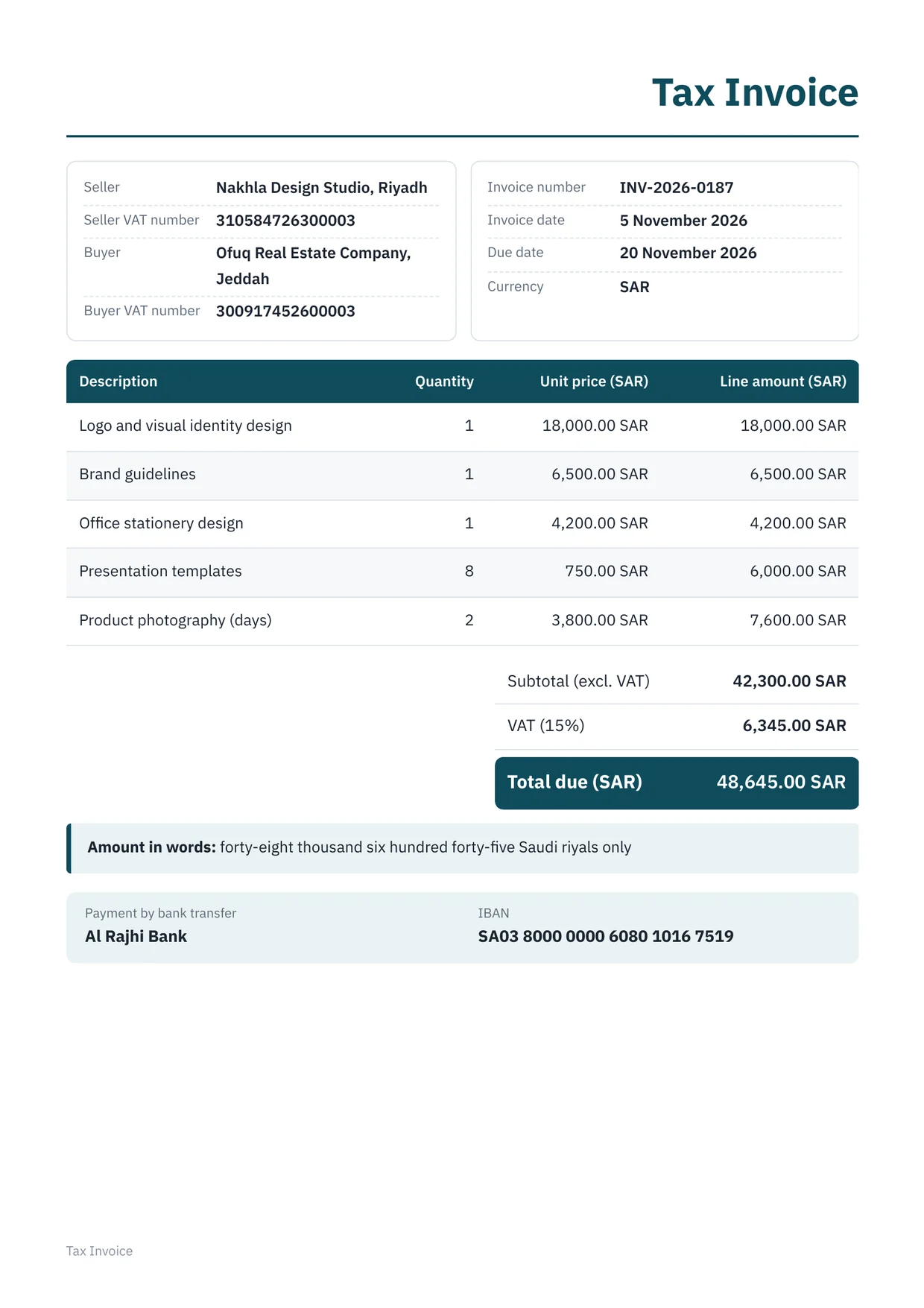
Tax invoice INV-2026-0187, VAT and amount in words computed, sent to Ahmed from your secretary's address.
- Reminds Ahmed
No reply, so a short reminder goes out on the same thread.
- The transfer slip arrives
It reads the attachment: SAR 48,645, matching the amount due.
- Comes back to you
The invoice is paid, according to the transfer slip.
ApproveAsk for a change
Example: an invoice, from request to payment slip
The documents it makes, real and unedited
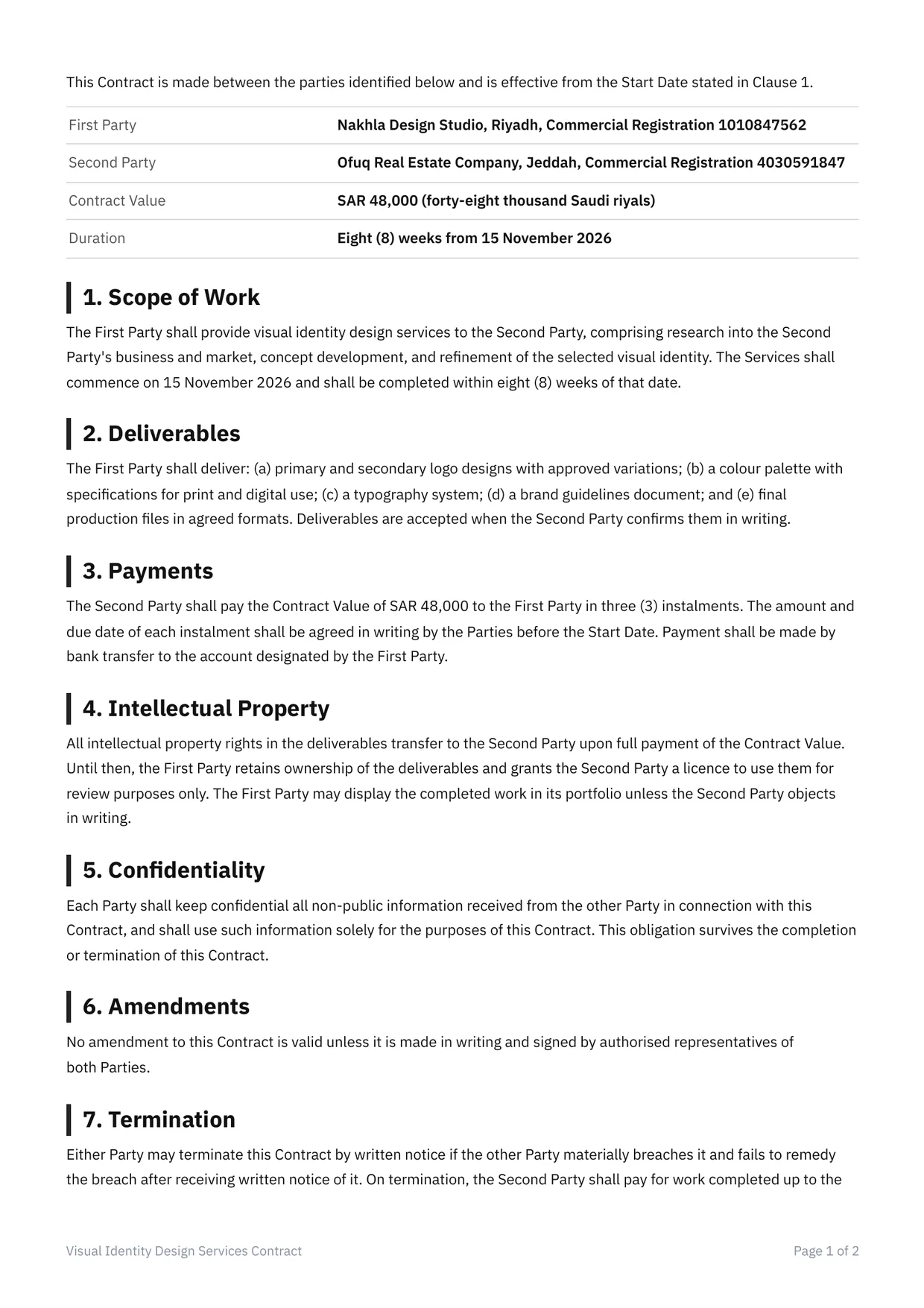
An invoice, a contract and a page of a report RAPTIX made from one-line requests. The same files it sends and follows up.
A real document RAPTIX made, not a mock-up

Or Cc it on your own email
Write to your client as usual and put your secretary's address in Cc; it follows up on the same thread.
- Your email to the client, secretary in Cc
“Please send the documents by Thursday.”
- Reminds on the same thread
Daily, weekly or monthly, up to 10 times, with everyone still copied.
- Tells you when the answer arrives
The documents arrived, in your own email thread.
What your secretary does
- Makes documents
- Invoices, quotations, contracts, letters, reports of up to 60 pages with sources, Excel sheets, PowerPoint decks.
- Edits in your words
- Ask for a change in a word or with a pen on the page; every change is a new version.
- Sends from its own address
- Ordinary emails from your secretary's address; it never enters or reads your mailbox.
- Follows up to the end
- Reminds before the deadline, reads replies and attachments, and asks for what is missing: a signature, stamp, paper or amount.
- Brings decisions to you
- Decisions reach you by email and in the chat with ready buttons; ask “what's pending?” and it tells you.
- Learns your decisions
- Make the same decision three times and it writes it as a rule in your words, and applies it next time.
Limits you should know
- Email only: no WhatsApp, phone calls or calendar bookings.
- It never enters your mailbox. To have it follow an email of yours, forward it or Cc its address.
- A signature you draw on the page is not a certified electronic signature, and it does not submit e-invoices to authorities.
Questions
What is the RAPTIX AI secretary?
An AI assistant that makes your documents (invoices, contracts, reports, sheets, decks), emails them, follows people up until what you need arrives, and comes back to you for decisions.
How do I give it a task?
Write one sentence in the chat, or email its address from your own. Name the person and their email, what you need, and by when.
Does it read my email?
No. It reads only emails you send it, forward to it or Cc it on.
Does it work in Arabic?
Yes, in Modern Standard Arabic and English, in documents and in emails.
Can I try it for free?
Yes. You start free, with no card.
Other documents RAPTIX makes
Write your secretary its first task
The document, who it goes to, and by when. One line is enough.