
Merge, split and reorder PDFs, in one sentence
Instead of opening a tool for each step, tell your secretary once: “merge the contract, the invoice and the price list into one file, drop the last page and add a password”. Word and Excel files become PDF first, and your originals stay as they are.
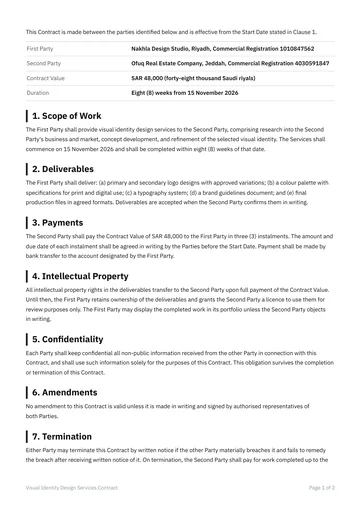
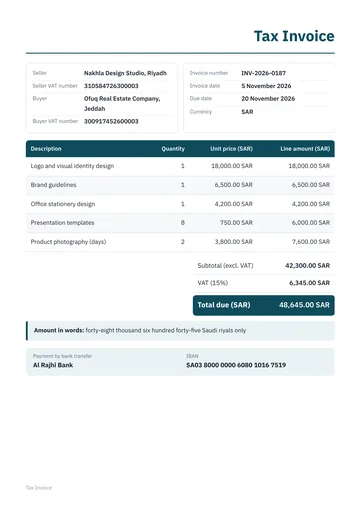
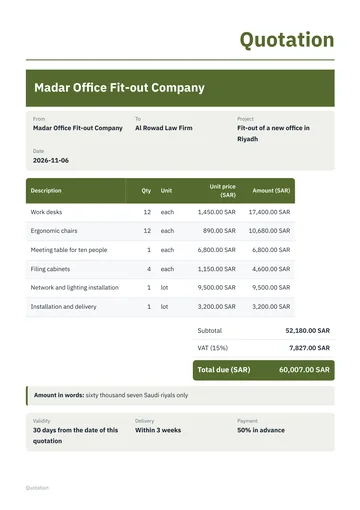
Three files in one PDF, in the order you gave
What you can ask for on the pages of a file
Steps you write in one sentence, applied in order to the resulting file:
Real pages from documents RAPTIX made
One request, several steps
Splitting a file
What it does with PDF pages
- Merge
- Several files into one PDF in the order you write, Word and Excel files included.
- Extract and split
- Takes the pages you name into a new file: “pages 2 to 4” or “3 to the last”.
- Delete and reorder
- Removes pages or puts them in a new order.
- Rotate
- Turns chosen pages by 90, 180 or 270 degrees.
- Watermark
- A short text on the pages you choose, such as “Draft” or “Confidential”.
- Password
- Protects the file with the password you write.
Limits you should know
- Page tools do not change words on a page. To change a word or number, use PDF editing.
- The result is a new file; your originals never change.
Questions
How do I merge PDF files into one?
Attach the files and write “merge them into one file in this order”. You get one PDF, and the originals stay as they are.
Can it merge Word and Excel with PDF?
Yes. It turns Word and Excel files into PDF first, then merges them.
How do I split a PDF?
Name the pages you want: “extract pages 12 to 18 into a separate file”. You can ask for more than one part.
Can it password-protect the file?
Yes, with exactly the password you write in your request.
Other documents RAPTIX makes
Attach your files and say what you need
The order, the pages and the protection, in one sentence.